
A website visitor rarely arrives without a question. They may want to know your service charges, check product availability, understand your process or find out how to get started. If they cannot find the information quickly, they may leave and contact a competitor instead. An AI chatbot can help prevent that by making useful information available whenever someone visits your website.
For small businesses, the decision is not simply about adding another feature. It is about choosing a solution that improves customer communication without creating unnecessary expenses or technical complexity. Understanding the AI chatbot for business website cost, available tools and practical benefits can help you decide whether a basic chatbot is enough or your business needs a more customised solution.
What Is the AI Chatbot for Business Website Cost in 2026?
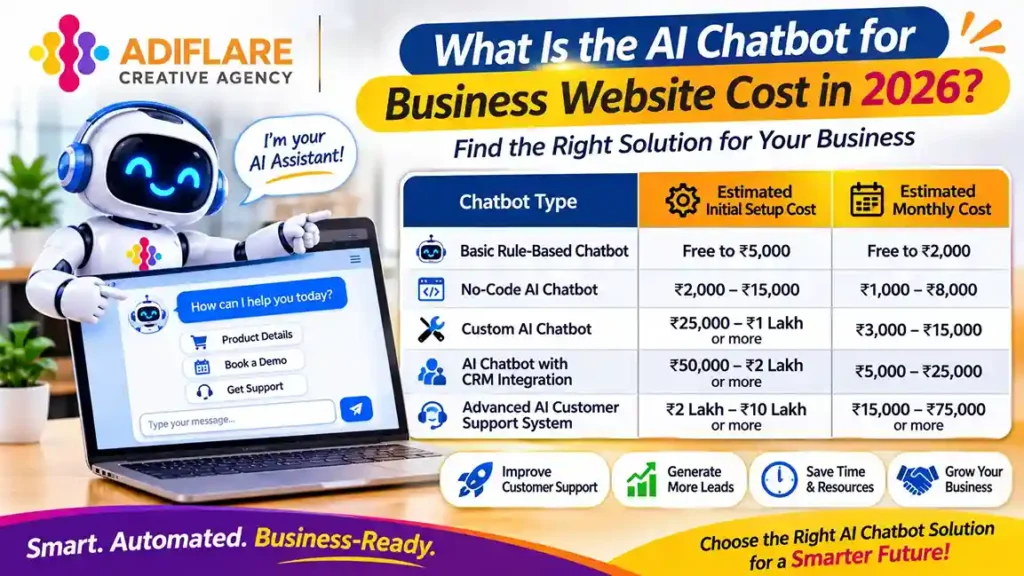
The AI chatbot for business website cost depends on how the chatbot is built, what tasks it performs and how many conversations it handles. A basic chatbot that answers common questions will generally cost less than a custom AI assistant connected to a CRM, product database or booking system.
For small businesses in India, the available options usually fall into four categories:
| Chatbot type | Estimated initial setup cost | Estimated monthly cost |
| Basic rule-based chatbot | Free to ₹5,000 | Free to ₹2,000 |
| No-code AI chatbot | ₹2,000–₹15,000 | ₹1,000–₹8,000 |
| Custom AI chatbot | ₹25,000–₹1 lakh or more | ₹3,000–₹15,000 |
| AI chatbot with CRM integration | ₹50,000–₹2 lakh or more | ₹5,000–₹25,000 |
| Advanced AI customer support system | ₹2 lakh–₹10 lakh or more | ₹15,000–₹75,000 or more |
These are indicative estimates, not fixed market quotations. The final amount depends on the development provider, AI model, conversation volume, integrations, hosting and maintenance requirements.
A small business with straightforward customer enquiries may only need a ready-made chatbot. However, a company that wants automated lead qualification, customer account access or appointment management may require custom development.
What Factors Affect the Cost of an AI Chatbot?
Two businesses can purchase an AI chatbot with similar features and still receive very different quotations. The difference usually comes down to the chatbot’s capabilities and the work required to connect it with existing business systems.
1. Chatbot Features and Complexity
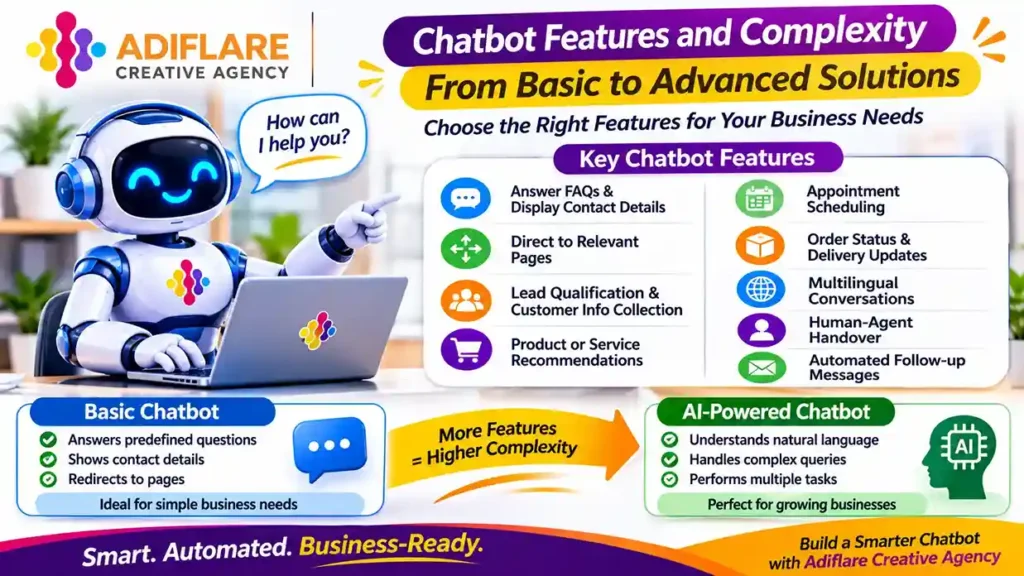
A basic chatbot can answer predefined questions, display contact details and direct visitors to relevant website pages. An AI-powered chatbot can understand natural language, interpret customer intent and generate contextual responses.
More advanced features may include:
- Lead qualification and customer information collection
- Product or service recommendations
- Appointment scheduling
- Order status and delivery updates
- Multilingual conversations
- Human-agent handover
- Automated follow-up messages
The more tasks a chatbot handles, the more development, configuration and testing it may require.
2. Website and CRM Integration
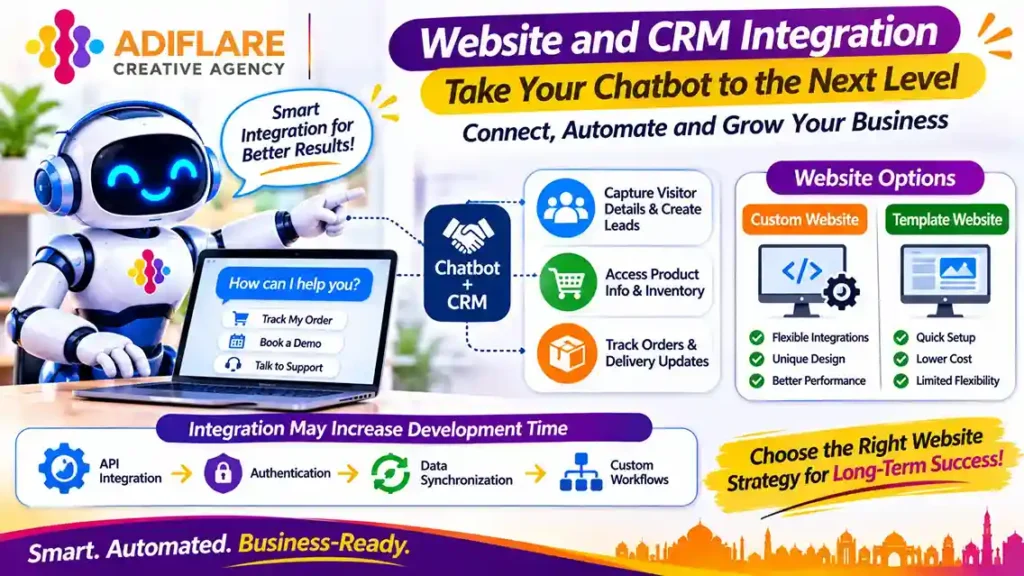
A chatbot that operates independently is generally easier to implement than one connected to several business applications.
For example, a chatbot integrated with a CRM can collect visitor details and automatically create leads. An e-commerce chatbot may need access to product information, inventory records and order updates.
Integration requirements can increase development time, especially when APIs, authentication, data synchronisation or custom workflows are involved.
If you are planning a new website alongside chatbot implementation, it is worth understanding the difference between custom and template website development. Your website’s structure can influence how easily new features and integrations are added later.
3. AI Model and Usage Volume
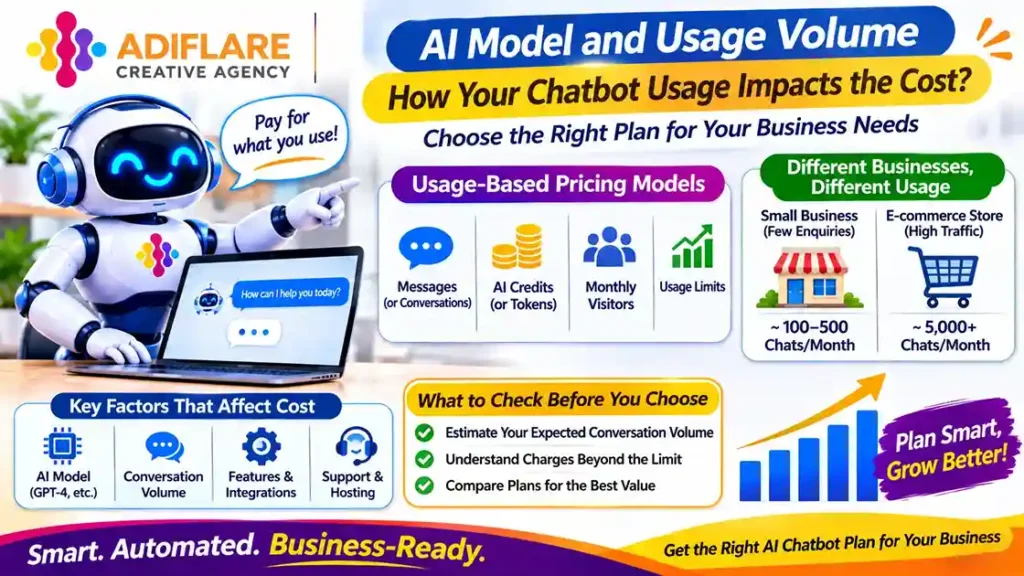
Many AI chatbot platforms charge according to usage. Depending on the provider, costs may be linked to messages, conversations, AI credits, tokens or monthly visitor limits.
A website receiving a few hundred enquiries each month will have different usage requirements from an e-commerce store handling thousands of customer conversations.
Before choosing a platform, estimate your expected conversation volume and check what happens when you exceed the included usage allowance.
4. Maintenance and Support
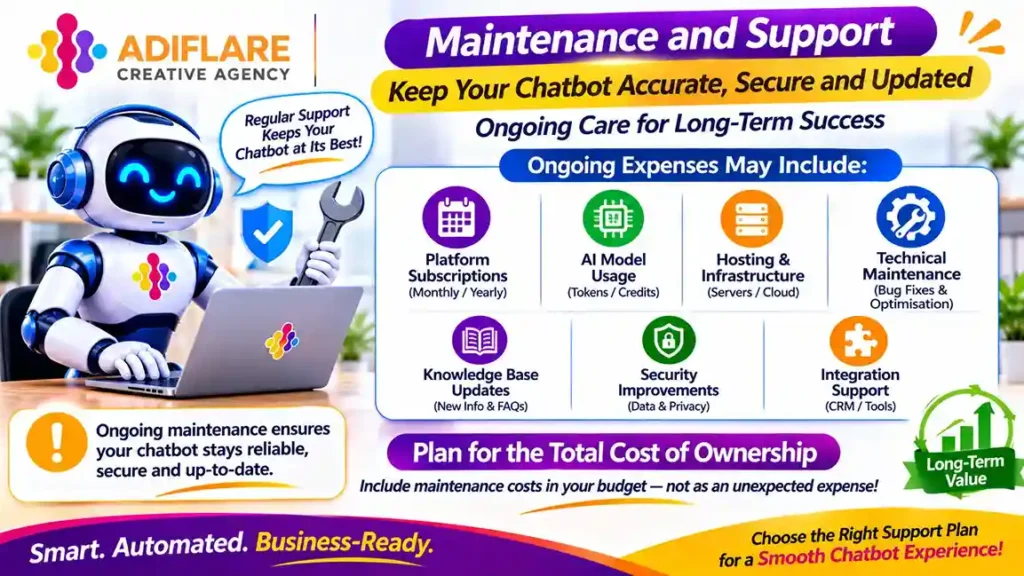
Launching a chatbot does not mean the work is finished. Its responses need to remain accurate as your products, services, pricing and business policies change.
Ongoing expenses may include:
- Platform subscriptions
- AI model usage
- Hosting and infrastructure
- Technical maintenance
- Knowledge base updates
- Security improvements
- Integration support
These expenses should be considered while calculating the total cost of ownership, not treated as unexpected additions after launch.
Benefits of Adding an AI Chatbot to a Business Website
A well-configured chatbot can do more than respond to basic questions. It can improve how customers interact with a business and help teams manage repetitive communication.
1. Respond to Customer Enquiries Around the Clock
Customers may visit your website outside regular business hours. If they cannot find answers, they might postpone their decision or look elsewhere.
An AI chatbot can provide instant responses to common questions about services, operating hours, pricing information and business policies. This gives visitors a way to find information even when your team is unavailable.
2. Automate Repetitive Customer Support Tasks
Most businesses receive similar questions every day. These may relate to delivery timelines, appointment availability, payment methods, return policies or service details.
A chatbot can handle these routine enquiries and allow employees to focus on conversations that require personal attention.
Businesses looking to automate customer inquiries on website should start by identifying the questions their teams answer most frequently. Automating those interactions first usually provides a clearer return than trying to build a chatbot that does everything.
3. Capture and Qualify More Leads
A chatbot can ask visitors relevant questions before collecting their contact details.
For example, a real estate website may ask about a visitor’s preferred location, property type and budget. A digital marketing agency may ask about the services required, website URL and monthly marketing goals.
The collected information can help sales teams understand customer requirements before making contact.
4. Improve the Website Experience
Visitors should not have to navigate multiple pages to find simple information. A chatbot can guide them towards relevant services, product categories, contact forms or booking pages.
This can make the website easier to use, particularly for first-time visitors who are unfamiliar with the business.
A chatbot should complement clear website navigation rather than replace it. Businesses should also maintain useful service pages and contact information. You can explore why this matters in our guide on why every Lucknow business needs a professional website.
5. Reduce Pressure on Customer Support Teams
When a support team spends a large part of its day answering routine questions, more complicated customer issues can take longer to resolve.
A chatbot can handle basic enquiries, collect relevant details and transfer complex conversations to the appropriate employee. This helps teams use their time more effectively without removing the human support customers may need.
Best AI Chatbot Tools for Small Businesses in India
Choosing the best AI chatbot for small business India depends on your website platform, budget, technical requirements and customer communication channels. Some tools are designed for quick setup, while others offer more flexibility through custom integrations.
Here are a few platforms worth evaluating.
1. Tidio
<text> </text>
Tidio combines live chat and AI-powered customer support features. Businesses can use it to answer common questions, manage website conversations and support customer service workflows.
It can be useful for small e-commerce stores and service businesses that want to manage customer interactions from a single platform.
Best for: Small businesses looking for website chat and customer support features.
2. Chatbase
Chatbase allows businesses to create AI chatbots using their own website content, documents and knowledge sources. This helps the chatbot respond to questions based on information supplied by the business.
It can be useful for companies that want visitors to ask questions about services, policies or product information without building a chatbot from scratch.
Best for: Businesses that want a chatbot trained on their existing content.
3. Botpress
Botpress provides tools for building more customised AI assistants and conversational workflows. It offers greater flexibility for businesses that need specific logic, integrations and control over chatbot behaviour.
However, advanced implementations may require technical knowledge and additional configuration.
Best for: Businesses with custom chatbot requirements and more complex workflows.
4. Intercom
Intercom offers customer communication and support tools, including AI-powered assistance. It is designed to help businesses manage conversations, support requests and customer interactions across different stages of the customer journey.
Its broader feature set may be more suitable for growing businesses with established customer support processes.
Best for: Businesses that need a more comprehensive customer communication platform.
5. WhatsApp Business Platform with an AI Chatbot
For businesses in India, WhatsApp is an important customer communication channel. An AI chatbot connected to the WhatsApp Business Platform can help manage enquiries, share information and support customer conversations beyond the website.
A combined WhatsApp and website AI bot can provide a more consistent experience by allowing customers to interact through their preferred channel.
Best for: Local businesses, service providers and e-commerce companies that receive enquiries through both website chat and WhatsApp.
Note: Platform features, pricing plans and usage limits can change. Check the provider’s current terms and integration requirements before making a decision.
Website Chatbot vs WhatsApp AI Chatbot: Which Should You Choose?
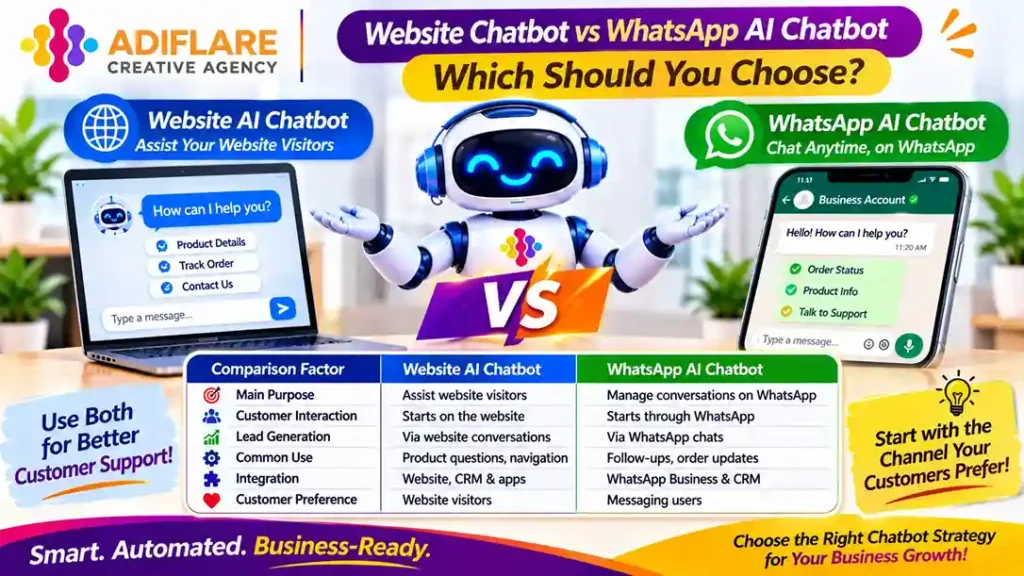
| Comparison factor | Website AI chatbot | WhatsApp AI chatbot |
| Main purpose | Assist website visitors | Manage conversations on WhatsApp |
| Customer interaction | Starts directly on the website | Starts through WhatsApp |
| Lead generation | Collects information through website conversations | Collects information through WhatsApp chats |
| Common use | Service enquiries, product questions and website navigation | Follow-ups, customer support and order updates |
| Integration | Website, CRM and business applications | WhatsApp Business Platform and CRM |
| Customer preference | Useful for visitors exploring a website | Useful for customers who prefer messaging |
For many small businesses, using both channels makes sense. A website chatbot can answer questions from visitors, while WhatsApp can support follow-up conversations and ongoing communication.
However, a business should not add multiple channels simply because the technology is available. Start with the channel where customers already interact with your team, then expand when there is a clear business need.
How to Choose the Right AI Chatbot for Your Business
The right chatbot is not necessarily the one with the most features. It is the one that solves a genuine communication problem without making your website difficult to manage.
Consider these points before selecting a platform:
- Identify common enquiries: Review customer emails, WhatsApp messages and support conversations to find repetitive questions.
- Define the chatbot’s purpose: Decide whether you need lead generation, customer support, appointment booking or product recommendations.
- Check integration options: Confirm that the chatbot works with your website platform, CRM and other essential applications.
- Review usage limits: Understand message allowances, AI credits and additional charges before committing to a subscription.
- Test response quality: Check whether the chatbot provides accurate answers using your actual business information.
- Keep human support available: Make sure customers can reach a real person when their questions require individual attention.
- Consider data security: Review how customer information is collected, stored and processed.
If your website is still being planned, consider chatbot requirements during development rather than treating them as an afterthought. This can make future integrations easier and reduce unnecessary rework.
How to Implement an AI Chatbot on Your Website
You do not need to automate every customer interaction at once. A gradual implementation allows you to understand what customers actually need and improve the chatbot based on real conversations.
Step 1: Identify the main customer questions
List the questions your team receives most often. Focus on topics that have clear, consistent answers, such as service details, business hours, pricing policies and appointment procedures.
Step 2: Prepare accurate business information
Create a knowledge base containing updated information about your services, products, policies and frequently asked questions. The quality of this information directly affects the usefulness of an AI chatbot.
Step 3: Select a suitable platform
Compare ready-made chatbot tools and custom development options. Consider your budget, technical requirements, integrations and expected conversation volume.
Step 4: Add the chatbot to your website
Most platforms provide a website widget or installation script. Depending on your website technology, the chatbot can be added through the website settings, a plugin or direct code implementation.
Step 5: Test real customer scenarios
Ask different types of questions and check whether the chatbot understands them correctly. Test unclear queries, incorrect information, lead collection and human-agent handover.
Step 6: Monitor and improve performance
Review conversation logs, unanswered questions, customer feedback and lead quality. Update the knowledge base regularly and refine responses whenever the chatbot provides incomplete or inaccurate information.
Conclusion
An effective website chatbot should make customer communication easier, not add another complicated system to manage. Start with your most common enquiries, choose a platform that fits your requirements and expand its capabilities as your business grows. If you want to integrate AI-powered customer engagement into a well-planned website and digital strategy, AdiFlare, a digital marketing agency in Lucknow, can help you identify the right approach. Get in touch with AdiFlare to discuss your website and business requirements.
Frequently Asked Questions
1. How much does it cost to add a custom AI customer support chatbot to my business website?
A custom chatbot can range from a few tens of thousands of rupees to several lakhs, depending on its features and integrations. Monthly expenses may also apply for AI usage, hosting and maintenance. A clear feature list helps developers provide a more realistic estimate.
2. Can I add an AI chatbot to a WordPress website?
Yes. Most chatbot platforms provide plugins, embed codes or website widgets that work with WordPress. The installation process depends on the selected tool and website configuration. You should test the chatbot on desktop and mobile devices before making it available to visitors.
3. Can an AI chatbot generate leads for a small business?
Yes. It can ask visitors about their requirements, collect contact information and identify potential customers based on predefined criteria. For better results, connect the chatbot with a CRM or lead management system so your sales team can follow up without manually transferring information.
4. Is a free AI chatbot suitable for a small business?
A free chatbot can be sufficient when customer enquiries are limited and the required functionality is basic. However, free plans may restrict conversations, integrations, branding or AI usage. Review these limitations before selecting a platform for long-term business use.